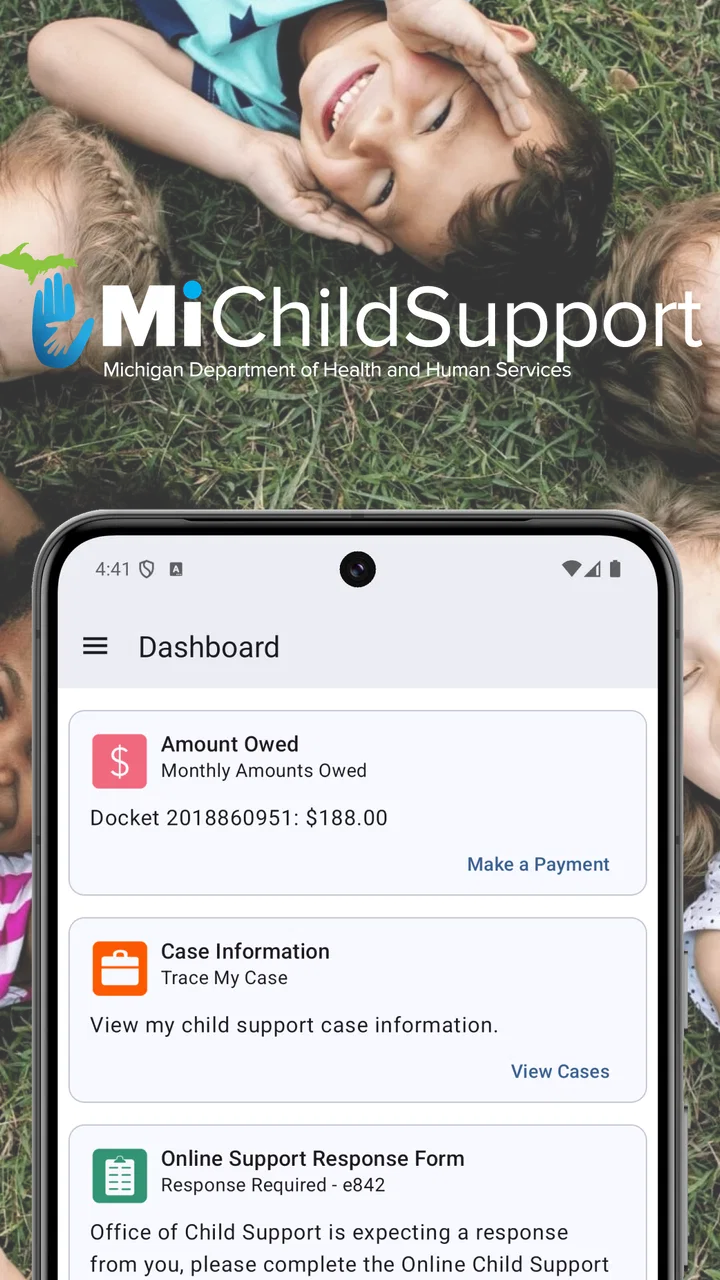
MiChildSupport
- 4.1
- Rating
- 10.00K
- Installs
- Free
- Price

 Analysis by App-foxy
When child support becomes part of everyday household planning, the hardest part is often not understanding the obligation itself but keeping track of what needs attention while life carries on around it. I tested MiChildSupport with that practical problem in mind. It is a free parenting app from the State of Michigan, designed as a direct mobile connection to a child support case rather than as a general family organizer or budgeting tool.
That distinction matters. This is not an app for managing school calendars, splitting grocery costs, or coordinating custody exchanges. Its usefulness comes from putting child-support-related access on a phone, where a parent can check in without relying entirely on paper notices, a desktop browser, or another person’s account. I found the experience most relevant for parents who already have a Michigan child support case and want a more convenient way to stay connected to it.
The app has an average rating of 4.1 from around 150 ratings, with over 10 thousand installs. Those figures suggest a modest but established audience rather than a mass-market family app. It is free to use, rated for Everyone, and the current version is 1.4. The technical requirement is Android 5.0 or later, which makes it accessible on many older Android phones as well as newer devices.
You May Also Like

 Blood Strike: 2.5 Anniversary
Blood Strike’s Loadouts Turn Every Drop Into a Tactical Gamble
A close look at Blood Strike’s custom loadouts: how fast access to signature weapons reshapes its battle royale rhythm, rewards preparation, and narrows the gap between fights.

 Pandora - Music & Podcasts
Pandora’s Music Is Easy to Start, but Harder to Recover
Pandora’s strength is its low-effort path from a seed to a station. Its weak spot is how much confidence it asks you to place in connection, setup, and quiet recovery.

 8 Ball Pool
 Is Built on Rivalries, Rematches, and Routine
A close look at the rivalries, rematches, shared routines, and unanswered safety questions that turn a quick pool match into a persistent mobile community.

 Samsung Music
’s Quiet Strength Is Playing What You Already Own
Its reach comes less from spectacle than from dependable access to a personal library. That simplicity is both the app’s strongest retention engine and its ceiling.

 AccuWeather: Weather Radar
AccuWeather Review: A Quick, Clear Forecast for Everyday Decisions
For everyday plans, the best forecast is the one you can understand quickly. AccuWeather makes rain timing, radar, and local conditions easy to act on, with a few trade-offs.

 Hill Climb Racing
Why Hill Climb Racing Still Turns Crashes Into One More Run
A tiny car, a bumpy hill and one more upgrade: Hill Climb Racing keeps resurfacing because its simple chaos makes every near-miss feel personal.
More From Our News Desk
View All News


Using it in a shared household
The most realistic use case is a busy household where one parent needs to check case information while handling normal responsibilities. Imagine a parent standing in a school pickup line, preparing dinner, or trying to answer a question from a co-parent. Opening a dedicated child support app can be more practical than waiting to get to a computer. That convenience is the main reason I would recommend trying it instead of treating the service as something that only gets checked when a letter arrives.
Shared-device use requires more care. A family tablet or a phone passed between adults may be convenient, but a child support case is personal information. I would not treat MiChildSupport as a household dashboard that everyone should casually open. The safer habit is to use it from the parent’s own device where possible, keep the account session under that adult’s control, and avoid handing over an unlocked phone simply because the app is installed.
This is an important difference between a parenting app and a typical shared family organizer. A calendar can be intentionally visible to several people. Case-related information may need a much narrower boundary. MiChildSupport is useful in a shared household only when the adults agree about who is responsible for access and when the account holder keeps control of the device and sign-in process.
I also think the app works better as a personal reference point than as a replacement for conversation. If two parents are coordinating expenses or timing, one person can use the app to check their own case connection, then discuss the practical result directly. The app may help reduce uncertainty, but it should not become a reason to expose private account details to children, visitors, or other relatives.
What I would do before handing over the phone
If a parent needs help from a partner, trusted relative, or support worker, I would keep the phone in my own hands and navigate the relevant screen myself. That small habit protects the account boundary without making the app difficult to use. It also avoids the common mistake of assuming that a shared device automatically means shared account access.
For households with several adults, it is worth deciding in advance which person checks the case and how information will be communicated. One adult might be responsible for reviewing the account, while both parents discuss dates or payment questions outside the app. That arrangement is less confusing than multiple people repeatedly trying to sign in on the same device.
My strongest practical advice is to treat the app as a private case doorway, not as a family noticeboard. That mindset makes the shared-device question much easier. The app can support household coordination, but the account itself should remain attached to the parent whose case it represents.
Setup, account boundaries, and first impressions
MiChildSupport is a focused tool, so I approached setup with a different expectation from a social parenting app. The goal is not to build a child profile, add relatives, or create a family network. The important question is whether the right parent can establish a dependable connection to the right child support case and then return to it without unnecessary friction.
That makes accuracy during setup especially important. I would slow down when entering or confirming identifying information, read each screen carefully, and avoid rushing simply because the app looks straightforward. A case-related app is not the place to guess at a detail and hope it can be corrected later. If the service presents an account or case selection step, I would verify that it belongs to the intended parent before treating the connection as complete.
The app’s age rating of Everyone should not be confused with unrestricted family access. That rating describes the suitability of the app’s content, not permission for a child to use an adult’s case account. In practice, I see it as an administrative service that happens to be safe for a broad audience to download, while the information inside still belongs to the responsible adult.
Another useful boundary is separating the app from general financial records. MiChildSupport may help a parent stay connected to a child support case, but I would still keep personal budgeting, bank records, receipts, and custody documentation organized elsewhere. Combining everything into one phone folder can feel efficient, yet it can also make private information easier to reveal accidentally. A simple folder name and a screen lock are more sensible than assuming the app itself solves household privacy.
Why a dedicated app can be better than the usual alternatives
The usual alternatives are a desktop browser, printed correspondence, phone calls, or relying on another adult to pass along information. Each has a place. A browser may offer a larger view when a parent needs to study several details. Paper can be useful for records. A phone call may be necessary when something is unclear or urgent. But an installed app reduces the number of steps between the parent and the case connection.
That convenience is not the same as completeness. A mobile screen is better for quick checks than for lengthy reading or comparing documents. If I needed to understand a complicated issue, I would not limit myself to the app simply because it is convenient. I would use it as a starting point, then move to the appropriate official support channel or a larger screen when the situation required more careful review.
The best setup, in my view, is therefore a combination: MiChildSupport for regular mobile access, a secure place for important records, and direct assistance for questions that cannot be settled by reviewing the case information. Expecting one small app to handle all three jobs would create disappointment.
Small habits that make the app more useful
I would check the app at a consistent point in my routine rather than opening it only during an argument or after a missed expectation. A quiet weekly review, for example, can help a parent notice what needs follow-up while there is still time to ask a question. The exact routine will differ by case, but the principle is useful: regular checking is less stressful than trying to reconstruct events from memory.
I would also write down the date of any important check and keep separate notes about questions. This does not duplicate the app unnecessarily. It creates a simple personal record of what I reviewed and what I still need to clarify. The trade-off is a little extra organization, but it prevents the app from becoming the only place where a parent remembers an important detail.
Finally, I would update the app through the normal device store when an update is offered and keep the phone’s operating system reasonably current. The current version is 1.4, and the minimum Android requirement is 5.0. That broad compatibility is helpful for households using older phones, but older devices can still have their own security and performance limitations.
Coordination without turning the app into a co-parenting platform
MiChildSupport can support coordination, but I would be careful about what “coordination” means here. It is best understood as helping a parent stay informed about their own child support case. It is not a substitute for a shared calendar, messaging agreement, parenting plan, or direct conversation between co-parents.
For example, if one parent wants to confirm a case-related detail before discussing a household expense, the app can be a useful first stop. The parent can review the information available to them, identify the exact point that needs discussion, and then speak more clearly with the other adult. That is more productive than starting with a vague statement such as “I think something changed.”
At the same time, I would avoid using a screenshot or a quick glance at the app as the entire explanation of a disagreement. A case screen may provide context, but it does not automatically explain every family circumstance, payment arrangement, or communication problem. If the other parent has a different question, both adults may need to look at their own official information or contact the relevant authority.
This is where MiChildSupport compares favorably with informal alternatives but less favorably with a full co-parenting platform. Text messages and shared notes are flexible, yet they can become disorganized. A co-parenting service may be better for schedules and conversations. MiChildSupport is more appropriate when the specific need is staying connected to the Michigan child support case itself.
A practical coordination routine
In a household that wants less friction, I would use a three-step routine. First, the parent who owns the case checks the app privately. Second, that parent writes down the question or action that matters, without forwarding private account material unnecessarily. Third, the adults discuss the practical consequence using their agreed communication method.
- Review the case connection from the responsible adult’s device.
- Separate confirmed information from questions that still need clarification.
- Discuss household planning without sharing the account login or leaving the phone unlocked.
This routine is helpful because it separates information access from family negotiation. The app handles the first part; the adults handle the second. It also reduces the temptation to make the child a messenger between parents, which is especially important in households where financial conversations can become tense.
A less obvious trade-off is that convenience can encourage overchecking. A parent may open the app repeatedly because it is always available, then interpret a lack of visible change as a complete answer. I would resist that habit. Mobile access is valuable, but it should lead to calmer decisions, not constant monitoring or repeated arguments.
Age, trust, and who should use it
The Everyone rating makes MiChildSupport approachable from a content perspective, but the appropriate user is still an adult connected to a child support case. I would not install it on a child’s phone for the child to manage, and I would not expect a young person to interpret case information responsibly without adult guidance. The subject matter is administrative and personal even when the app itself is not mature or restricted content.
For teenagers who are beginning to ask questions about support, the better approach is an age-appropriate conversation led by a parent or trusted adult. The parent can decide what information is relevant and what should remain private. Showing a child an adult account screen is not the same as helping the child understand family finances, and the app should not be used to place responsibility for adult obligations on the child.
Trust also matters between co-parents. I would use the app to verify my own connection, not to encourage secret surveillance of another adult’s account. If both parents have legitimate reasons to review their own case information, each should use the proper account access available to them. Sharing a password may seem convenient in the short term, but it weakens accountability and makes it harder to know who accessed what.
For grandparents, guardians, or relatives helping with household administration, the right arrangement depends on the parent’s comfort and the boundaries of the case. I would prefer guided assistance over handing over permanent access. The helper can sit with the parent while the parent signs in and makes the decisions. This preserves trust while still making the app usable for someone who is less comfortable with smartphones.
When another option is better
I would skip MiChildSupport if I did not have a Michigan child support case or if my main need was unrelated to child support. It is not a general parenting planner, a child expense tracker, or a substitute for legal advice. Installing it simply because it appears under parenting would add clutter without solving a real problem.
I would also choose another route when the task requires extensive document review, detailed legal interpretation, or a conversation about a disputed issue. A browser on a larger screen may be easier for reading, while an official contact channel may be more appropriate for clarification. The app is strongest for convenient access and routine awareness, not for resolving every complicated situation.
Parents who share one phone and cannot maintain a private account boundary may find the convenience less valuable than the privacy risk. In that situation, using an official web option from a controlled device, or contacting the relevant service directly, may be the better choice. The right tool is the one that lets the parent stay informed without exposing sensitive information to the rest of the household.
There is also a human limitation: an app cannot repair poor communication between adults. If the real problem is missed messages, conflicting expectations, or disagreement about responsibilities, MiChildSupport may provide useful reference information but will not replace a clear family arrangement. I would recommend it as one part of a process, not as the process itself.
My household verdict
After looking at it through the lens of shared devices, account boundaries, and co-parent coordination, I see MiChildSupport as a practical, narrowly focused service. Its value is not flashy design or a broad collection of parenting tools. Its value is giving a Michigan parent a mobile way to stay connected to a child support case, free of charge, without making every check depend on a computer or a paper file.
The State of Michigan is the developer, and that official connection is central to why I would consider the app for its intended audience. I would still keep expectations realistic: the app should complement careful recordkeeping and direct support when questions become complicated. A convenient case connection is helpful, but convenience does not remove the need to protect login details, verify context, and communicate responsibly.
For a parent who regularly needs mobile access and can keep the account private, I think the app is worth installing. The Everyone age rating and support for Android 5.0 or later make it approachable across a wide range of household devices, while the free price removes the usual barrier to trying it. I would begin with a private setup, confirm that the correct case connection is in place, and establish a simple checking routine.
For a child, a casual household user, or someone seeking a complete co-parenting system, I would recommend something else or no app at all. MiChildSupport is most successful when one responsible adult uses it deliberately, shares only the conclusions that matter, and keeps the account itself within a clear boundary.
My final recommendation is straightforward: use it as a private, official-feeling mobile reference for child support, not as a shared family control panel. In that role, MiChildSupport can make an otherwise easy-to-forget administrative responsibility more accessible while leaving the sensitive decisions where they belong—with the adults responsible for the case.
FAQs for MiChildSupport
01What is MiChildSupport, and what can I use it for?
MiChildSupport is a mobile service designed to help users manage child support information and related case activities from a smartphone. Depending on your state and account status, you may be able to review payment details, check case information, view notices, update contact information, or access agency resources. Available features can vary, so the app should be treated as a companion to official child support services rather than a replacement for legal or agency assistance.
02Who can use the MiChildSupport app?
MiChildSupport is generally intended for people involved in a participating child support case, such as custodial parents, noncustodial parents, and authorized individuals. You normally need valid case or account information to register or sign in. Access may depend on your state, the agency handling your case, and whether your records are eligible for online services. If registration fails, contacting the relevant child support office is usually the best next step.
03Is my personal and child support information secure in MiChildSupport?
Because the app may display sensitive financial, family, and case-related information, users should sign in only through the official application and keep their login details private. Use a strong password, enable device security, and avoid accessing the account on shared or public phones. The app may use standard security protections, but no online service is completely risk-free. Always review the privacy policy and sign out when necessary.
04Can I make or track child support payments through MiChildSupport?
MiChildSupport may provide payment-related information, including payment history, amounts, processing updates, or account balances, depending on the services supported in your jurisdiction. Some users may also be directed to an approved payment method or external payment portal. Processing times, fees, and available options can differ by state and case. Always confirm that a payment was successfully submitted and retain receipts or confirmation numbers.
05What should I do if MiChildSupport is not working or my case information is incorrect?
First, check that the app is updated, your internet connection is stable, and your sign-in details are entered correctly. Restarting the app or reinstalling it may resolve minor technical problems, but do not create duplicate accounts unless instructed. If information appears outdated, payments are missing, or your case cannot be found, contact the official child support agency handling your case, since app support may not be able to change legal or account records.
Pros
- Provides quick access to child support information and case updates.
- Secure login helps protect sensitive family and payment details.
- Useful payment history makes it easier to track support activity.
- Mobile access lets users check information without visiting an office.
- Official notices and messages can be reviewed from one central place.
Cons
- Availability and features may vary by participating state or agency.
- Some users may need an existing case account before using the app.
- Updates can be delayed if agency records have not synchronized.
- The interface may feel basic compared with modern banking apps.
- Technical issues could make time-sensitive case information temporarily unavailable.

MiChildSupport
Gallery